Procyon Essentials is a browser-based multitasking benchmark, designed to focus on real-world workloads that professionals use in everyday life. It runs a series of workloads that simulate juggling priorities and tasks, will not require any third-party software to run, and is Windows on Arm native.
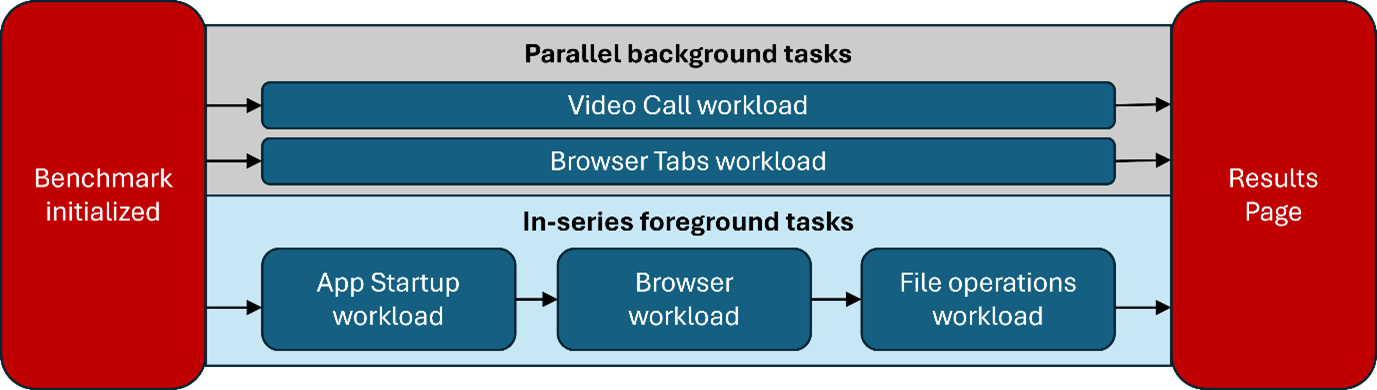
The full run comprises of multiple workloads run in a specific structure and order. Active foreground workloads are run in series, while the background workloads are run in parallel with the active foreground workloads.
When Procyon Essentials is opened, it initializes two background loads that loop throughout the duration of the test. The first workload simulates a video chat, like a Teams call, an activity many of us engage in during our workday. The second workload simulates a user having 30 background tabs open and ends with a rain map radar page to ensure consistent CPU activity from the tabs.
While the two background workloads are running, we first cycle through App startup, mimicking how busy professionals switch between different tasks throughout their day. App startup is a feature we have brought back by popular demand and is inspired by our previous browser-focused benchmark, PCMark10.
After the App startup, we simulate a heavy browsing session with realistic scenarios centered around work chat, social media at work, and number crunching on a CRM dashboard. The benchmark also features a new File Operations test that performs operations like file move, copy-paste & deletion, and heavier workloads like file compression and decompression.
The workloads for this benchmark that run in series and parallel are shown in the diagram below.